

In today’s interconnected digital world, cybersecurity is no longer an option—it is a necessity. With cyber threats growing more sophisticated every day, having reliable protection on your computer, smartphone, and other digital devices is essential. From ransomware attacks and phishing scams to subtle spyware, malicious software can compromise your personal data, financial information, and digital identity in seconds.
Choosing the top antivirus software tailored to your specific needs is the first and most effective line of defense against these evolving online threats. In this comprehensive guide, we will break down the best antivirus solutions available, compare free versus paid protection, and help you decide which security suite is right for you.
Why You Still Need Antivirus Software in 2026
A common misconception among modern computer users is that built-in security systems—like Windows Defender or macOS security protocols—are enough to keep devices safe. While native protection has vastly improved over the years, standalone antivirus software remains vital for several reasons:
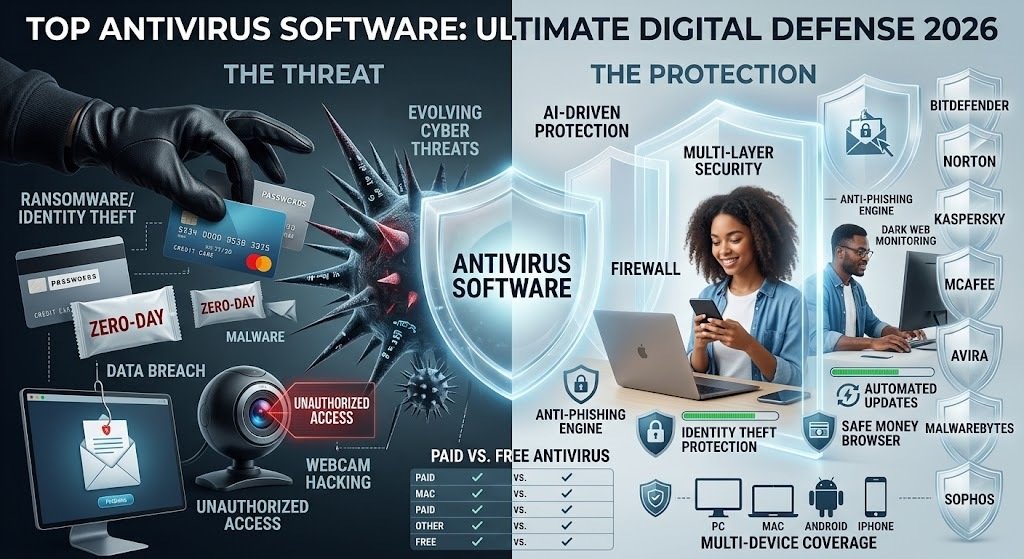
- Advanced Threat Detection: Modern cyber threats use zero-day exploits, which are brand-new security vulnerabilities unknown to standard built-in firewalls. Top-tier antivirus software utilizes AI-driven behavior analysis to stop these threats before they execute.
- Comprehensive Identity Theft Protection: Beyond stopping viruses, premium antivirus suites monitor the dark web for leaked passwords, credit card numbers, and Social Security credentials.
- Multi-Device Coverage: Modern households use a mix of Windows PCs, MacBooks, Android phones, and iPhones. A single antivirus subscription often secures all your family devices under one dashboard.
- Phishing & Webcam Protection: Fake websites designed to steal login credentials and unauthorized webcam access attempts are routinely blocked by specialized anti-phishing engines.
Top 7 Antivirus Software Solutions
Here is an in-depth review of the leading antivirus software available today, evaluated based on detection rates, system impact, features, and overall value.
1. Bitdefender Total Security (Best Overall Protection)
Bitdefender continuously tops independent lab tests for malware detection efficiency while maintaining a minimal impact on system performance.
- Key Features: Real-time threat protection, multi-layer ransomware detection, integrated VPN, parental controls, and webcam/microphone protection.
- Pros:
- Exceptional malware detection scores.
- Autopilot mode optimizes system resource usage seamlessly.
- Comprehensive suite of extra features including a password manager.
- Cons:
- Unlimited VPN access requires a separate add-on subscription.
- Best For: Users seeking maximum security without slowing down their hardware.
2. Norton 360 Deluxe (Best for Complete Feature Set)
Norton has been a trusted name in cybersecurity for decades, and Norton 360 Deluxe continues that legacy by offering an all-in-one security package.
- Key Features: Secure VPN with unlimited data, dark web monitoring, 50GB cloud backup, password manager, and smart firewall.
- Pros:
- Includes a full-featured VPN without data caps.
- Robust identity theft protection features.
- Excellent cross-platform management.
- Cons:
- Renewal prices can be higher than initial sign-up discounts.
- Can occasionally feel heavy on background system memory.
- Best For: Families and individuals looking for complete identity and network security.
Top Antivirus Book
3. Kaspersky Premium (Best for Advanced Malware Defense)
Despite market competition, Kaspersky consistently delivers some of the highest virus detection scores in industry testing.
- Key Features: Advanced anti-malware engine, safe money browser for banking, smart home Wi-Fi monitoring, and remote access detection.
- Pros:
- Flawless scores in zero-day exploit and ransomware detection.
- Very easy-to-use interface.
- Specialized financial protection tools.https://softsdeals.com/
- Cons:
- Availability and preferences may vary depending on regional restrictions.
- Best For: Users focused purely on top-tier virus detection rates and secure online banking.
4. McAfee Total Protection (Best for Multiple Devices)
McAfee is an ideal choice for households with numerous computers, tablets, and smartphones that require unified management.
- Key Features: Unlimited device plans (select tiers), identity monitoring, automated protection score, web advisor browser extension, and secure file shredder.
- Pros:
- Protects an unlimited number of devices under a single account on premium tiers.
- Excellent identity protection features.
- User-friendly interface designed for non-technical users.
- Cons:
- Full system scans can take longer than competitors.
- Best For: Large families or small businesses with dozens of devices.
5. Avira Prime (Best for Lightweight Performance)
Avira offers a modular, lightweight antivirus engine that delivers powerful defense without hogging system RAM or CPU resources.
- Key Features: Real-time protection engine, automatic software updater, performance optimizer, and secure VPN.
- Pros:
- Extremely light on system resources.
- Software updater fixes security vulnerabilities in third-party apps automatically.
- High-performing free version available.
- Cons:
- Customer support response times can be slower on lower tiers.
- Best For: Gamers, creators, or owners of older PCs who need strong security without lag.
6. Malwarebytes Premium (Best for Remediation & Malware Removal)
Malwarebytes started as a specialized malware cleanup utility and has evolved into a full-fledged real-time antivirus replacement.
- Key Features: Anomaly detection, ransomware shielding, exploit protection, and aggressive malware removal.
- Pros:
- Outstanding at cleaning up already-infected systems.
- Blazing fast system scans.
- Works well alongside other basic security tools.
- Cons:
- Lacks some secondary features like comprehensive parental controls or cloud backup.
- Best For: Users who want lightweight, hassle-free protection focused specifically on modern malware and spyware.
7. Sophos Home Premium (Best for Remote Family Management)
Sophos brings enterprise-grade business security tools into a simplified home package designed for remote control.
- Key Features: Cloud-based management console, AI threat detection, web filtering, and remote security management for up to 10 devices.
- Pros:
- Allows you to manage family members’ devices remotely from anywhere.
- Strong defense against advanced banking Trojans and ransomware.
- Cons:
- Web-based interface may not appeal to users who prefer a traditional desktop app.
- Best For: Tech-savvy users who manage security for non-tech-savvy relatives living elsewhere.
Quick Comparison Table
| Antivirus Name | Best Feature | System Impact | VPN Included? | Device Limit |
| Bitdefender Total Security | Balanced Protection | Minimal | Yes (200MB/day) | Up to 5 |
| Norton 360 Deluxe | Feature-Rich / Cloud Backup | Moderate | Yes (Unlimited) | Up to 5 |
| Kaspersky Premium | Detection Accuracy | Minimal | Yes | Up to 5 |
| McAfee Total Protection | Unlimited Devices | Moderate | Yes | Unlimited (Select tiers) |
| Avira Prime | Lightweight Engine | Very Low | Yes | Up to 5 |
| Malwarebytes Premium | Fast Scan & Removal | Very Low | Optional Add-on | Up to 5 |
| Sophos Home Premium | Remote Management | Minimal | No | Up to 10 |
Free vs. Paid Antivirus Software: Which One Should You Choose?
When looking for the top antivirus software, one of the primary decisions you will face is whether to stick with a free solution or upgrade to a paid subscription.
Free Antivirus Software
- What it offers: Basic real-time protection, manual scanning, and basic web protection against known virus signatures.
- Limitations: Lacks protection against advanced zero-day threats, ransomware shields, password managers, VPNs, and live customer support.
- Verdict: Suitable for basic users who browse only trusted websites and keep their software strictly updated.
Paid Antivirus Software
- What it offers: Complete security ecosystems featuring proactive AI threat detection, anti-phishing shields, dark web monitoring, VPNs, parental controls, and automatic updates.
- Verdict: Essential for anyone who handles online banking, shopping, confidential work files, or sensitive personal data on their devices.
The book of Antivirus

Key Features to Consider When Selecting an Antivirus
To select the best software for your specific hardware and software ecosystem, keep these primary factors in mind:
- Malware Detection Rates: Look for products certified by independent testing laboratories like AV-TEST and AV-Comparatives. Aim for software that scores between 99.5% and 100% in real-world protection tests.
- System Performance Impact: A great antivirus runs quietly in the background without causing system slowdowns during gaming, video editing, or heavy multitasking.
- Real-Time Ransomware Defense: Ransomware encrypts your files and demands payment for the decryption key. Ensure your chosen suite features dedicated behavior-based ransomware monitoring.
- User-Friendly Interface: The software should be easy to navigate, allowing you to run quick scans, adjust firewall settings, and view threat logs without complex configurations.
- Pricing and License Flexibility: Pay attention to multi-device discounts and long-term pricing models so you don’t encounter unexpected renewal fees.
Essential Cyber Hygiene Tips Beyond Antivirus
While installing top-tier antivirus software provides a formidable defense layer, practicing good digital habits is equally important:
- Keep Software Updated: Enable automatic updates for your operating system, web browsers, and applications to patch security vulnerabilities.
- Use Strong, Unique Passwords: Combine standard security software with a password manager to store complex, unique passwords for every account.
- Enable Two-Factor Authentication (2FA): Always activate 2FA on sensitive accounts (email, banking, social media) to add a second verification step.
- Beware of Phishing Email Links: Never click on suspicious links or download attachments from unverified senders, even if the email looks official.
Final Thoughts
Protecting your digital life requires reliable security software capable of blocking modern cyber threats before they cause damage. Modern security suites do much more than just delete standard viruses; they safeguard your identity, shield your network, and protect your privacy.
If you are looking for the absolute best balance of protection, features, and performance, Bitdefender Total Security and Norton 360 Deluxe remain the top antivirus software recommendations in 2026. However, if your primary goal is lightweight performance or securing multiple family devices, options like Avira Prime or McAfee Total Protection offer tailored advantages. Evaluate your specific security needs, select a suite that fits your setup, and keep your digital world protected today.